top of page

Top 5 Best Monitors Under $300 on Amazon (2026)

Screenshot 2026-06-12 090815.png
Computer Monitors

Choosing the right monitor can completely change your setup—whether you're gaming, working from home, or just upgrading from an old display. In the sub-$300 range, you can now get high refresh rates, sharp 1440p resolution, and excellent color accuracy, but not every monitor is worth your money.

What To Look For:

  • Performance

  • Panel Quality (IPS vs VA)

  • Material and Breathability

  • Refresh Rate

  • Response Time

Best Overall

TheraGun Prime.png
Acer’s Nitro QG271U is one of the strongest all-around choices in this price range. It delivers a crisp 27-inch 1440p IPS display with fast response times and up to 200Hz refresh rate, making it perfect for both competitive gaming and everyday productivity. Colors look vibrant thanks to its IPS panel, and motion clarity is excellent for fast-paced games.

Pros:

  • Sharp 1440p resolution (great for 27")

  • High refresh rate (up to 200Hz)

  • IPS panel with strong color accuracy

  • Good value for performance

Cons:

  • HDR is basic

  • Stand is limited in adjustability

Best Premium Performance
TheraGun Prime.png
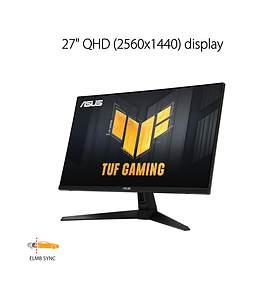
The ASUS TUF VG27AQ3A is one of the most refined options under $300, offering a 27-inch Fast IPS panel with 180Hz refresh rate. It’s especially strong for competitive gaming thanks to ASUS’s motion clarity features and excellent factory tuning. This is a great “no compromises” pick if you want both speed and image quality.

Pros:

  • Excellent motion clarity

  • 1440p sharpness at 27 inches

  • Strong build quality

  • Great for competitive gaming

Cons:

  • Slightly higher price than budget picks

  • HDR is limited

Best Feature-Packed Monitor

TheraGun Prime.png
The Gigabyte M27Q remains one of the most feature-rich monitors in this category. It offers 1440p resolution, 170Hz refresh rate, and a KVM switch, making it ideal for users who switch between multiple devices like a PC and laptop. It’s also known for strong color performance out of the box.

Pros:

  • Built-in KVM switch (huge productivity bonus)

  • Great color accuracy

  • 170Hz refresh rate

  • Excellent all-rounder

Cons:

  • Text clarity can vary due to subpixel layout

  • Stand is average

Best VA Contrast

TheraGun Prime_edited_edited_edited_edit
If you prefer deeper blacks and stronger contrast, the Dell S2722DGM is a great VA-panel option. It offers a 1440p curved display with 165Hz refresh rate, making it especially good for immersive gaming and movies.

Pros:

  • Strong contrast and deep blacks

  • Smooth 165Hz performance

  • Curved immersive design

  • Solid build quality


Cons:

  • Slower pixel response than IPS

  • Less accurate colors

Best Color Contrast

TheraGun Prime.png
LG’s 27GN800-B is a reliable IPS monitor that focuses on clean image quality and accurate colors. With 1440p resolution and 144Hz refresh rate, it’s ideal for users who care about visuals as much as gaming performance.

Pros:

  • Excellent color accuracy

  • Sharp 1440p image

  • Reliable IPS performance

  • Great for mixed use (work + gaming)

Cons:

  • 144Hz is lower than some competitors

  • No height-adjustable stand

Final Verdict

If you want the best overall monitor under $300, the Acer Nitro QG271U is the strongest all-round pick thanks to its 1440p IPS panel and high refresh rate.

For competitive gamers, the ASUS TUF VG27AQ3A delivers the smoothest performance and best motion handling. If you want productivity features, the Gigabyte M27Q stands out with its built-in KVM switch.

Meanwhile, the Dell S2722DGM is best for contrast-heavy gaming and media, and the LG 27GN800-B is the best choice for color accuracy and everyday use.

bottom of page